Cold Signal
Game Project 3 Summary
With a team of 15 people we had 7 weeks, the longest
development time of the 4 Game Project at Futuregames.
With a theme of "Environment" we set out to
make a game with a cold and harsh survival feel.
Cold
Signal was made in Unreal Engine 5. As a team we
followed scrum methodology using Jira to track progress
and Perforce as Version control. Other than the usual
bug fixing I mainly worked with the inventory system,
Bear AI and implementing interactions for the player.
Check
out the game here: Cold Signal

My Contributions
Inventory System
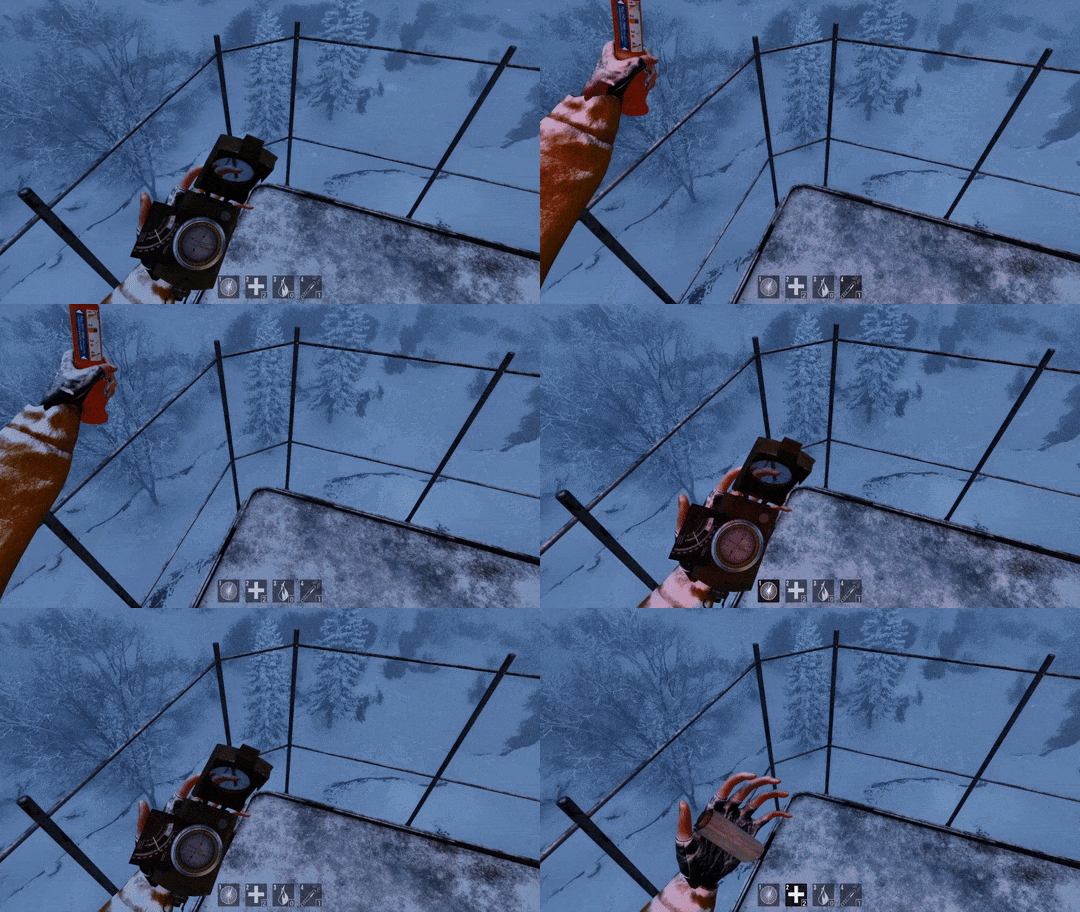
One of my responsobilities were making the inventory system. It was needed so the player has the ability and tools to survive the harsh cold enviroment. There are multiple item pickups placed throughout the map. The player can switch between and use 4 different items including a compass, bandages, heating packs and flares.
#pragma once

#include
                    "CoreMinimal.h"
#include
                    "Components/ActorComponent.h"
#include
                    "InventoryComponent.generated.h"

DECLARE_DYNAMIC_MULTICAST_DELEGATE_TwoParams(FOnEquipItem,
                    int32, ItemIndex, bool, isItemEquped);
DECLARE_DYNAMIC_MULTICAST_DELEGATE_OneParam(FOnItemUse,
                    int32, ItemIndex);

USTRUCT(BlueprintType)
struct
                    FEquipableItem : public FTableRowBase
{

                    GENERATED_BODY()


                    UPROPERTY(EditAnywhere, BlueprintReadWrite)

                    int32 CurrentAmount;


                    UPROPERTY(EditAnywhere, BlueprintReadWrite)

                    int32 MaxAmount;


                    UPROPERTY(EditAnywhere, BlueprintReadWrite)

                    TSubclassOf<AActor> ItemClass;


                    UPROPERTY(EditAnywhere, BlueprintReadWrite)

                    TSubclassOf<AActor> ItemPickupClass;


                    UPROPERTY(EditAnywhere, BlueprintReadWrite)

                    FTransform PickupTransform;
};

USTRUCT(BlueprintType)
struct
                    FKeyItem : public FTableRowBase
{

                    GENERATED_BODY()


                    UPROPERTY(EditAnywhere, BlueprintReadWrite)

                    int32 KeyType;


                    UPROPERTY(EditAnywhere, BlueprintReadWrite)

                    TSubclassOf<AActor> KeyPickupClass;


                    UPROPERTY(EditAnywhere, BlueprintReadWrite)

                    FTransform PickupTransform;
};

UCLASS(
                    ClassGroup=(Custom), meta=(BlueprintSpawnableComponent),
                    Blueprintable)
class COLDTURKEY_API UInventoryComponent
                    : public UActorComponent
{

                    GENERATED_BODY()


public:

                    // Sets default values for this component's
                    properties

                    UInventoryComponent();

protected:

                    // Called when the game starts

                    virtual void BeginPlay() override;


                    UPROPERTY(EditAnywhere, BlueprintReadWrite, Category =
                    "Inventory")

                    TArray<FEquipableItem> inventory;


                    UPROPERTY(EditAnywhere, BlueprintReadWrite, Category =
                    "Inventory")

                    TArray<FEquipableItem> savedInventory;


                    UPROPERTY(EditAnywhere, BlueprintReadWrite, Category =
                    "Inventory")

                    TArray<FKeyItem> KeyInventory;


                    UPROPERTY(EditAnywhere, BlueprintReadWrite, Category =
                    "Inventory")

                    int32 equipedItemIndex;


                    UPROPERTY(EditAnywhere, BlueprintReadWrite, Category =
                    "Inventory")

                    float maxFlareTime;


                    UPROPERTY(EditAnywhere, BlueprintReadWrite, Category =
                    "Inventory")

                    float currentFlareTime;


                    UPROPERTY(EditAnywhere, BlueprintReadWrite, Category =
                    "Inventory")

                    bool isItemEquped;


                    UPROPERTY(EditAnywhere, BlueprintReadWrite, Category =
                    "Inventory")

                    bool isFlareActive;


                    UFUNCTION(BlueprintCallable, Category =
                    "Inventory")

                    void UseItem(int32 ItemIndex);


                    UFUNCTION(BlueprintCallable, Category =
                    "Inventory")

                    void SetEquipedItemIndex(int32 ItemIndex);


                    UFUNCTION(BlueprintCallable, Category =
                    "Inventory")

                    void UnequipItem();


                    UFUNCTION(BlueprintCallable, Category =
                    "Inventory")

                    void ReduceItemAmountAtIndex(int32 ItemIndex);


                    UFUNCTION(BlueprintCallable, Category =
                    "Inventory")

                    bool AddItemAmountAtIndex(int32 ItemIndex);


                    UFUNCTION(BlueprintCallable, Category =
                    "Inventory")

                    void AddKey(FKeyItem Key);


                    UFUNCTION(BlueprintCallable, BlueprintPure, Category =
                    "Inventory")

                    bool HasKey(int32 Key);


                    UFUNCTION(BlueprintCallable, Category =
                    "Inventory")

                    void SaveInventory();


                    UFUNCTION(BlueprintCallable, Category =
                    "Inventory")

                    void LoadInventory();

public:

                    // Called every frame

                    virtual void TickComponent(float DeltaTime, ELevelTick
                    TickType, FActorComponentTickFunction* ThisTickFunction)
                    override;


                    UPROPERTY(BlueprintAssignable)

                    FOnEquipItem OnEquipItem;


                    UPROPERTY(BlueprintAssignable)

                    FOnItemUse OnItemUse;
};
#include "InventoryComponent.h"
void
UInventoryComponent::UseItem(int32 ItemIndex)
{
if (equipedItemIndex == -1)
{
UE_LOG(LogTemp, Warning, TEXT("Item at index %d is not
equipped"), ItemIndex);
return;
}
OnItemUse.Broadcast(ItemIndex);
}
void
UInventoryComponent::SetEquipedItemIndex(int32 ItemIndex)
{
if (ItemIndex != equipedItemIndex)
{
isItemEquped = true;
equipedItemIndex = ItemIndex;
}
else
{
isItemEquped = false;
equipedItemIndex = -1;
}
OnEquipItem.Broadcast(ItemIndex, isItemEquped);
}
void
UInventoryComponent::UnequipItem()
{
equipedItemIndex = -1;
isItemEquped = false;
}
void
UInventoryComponent::ReduceItemAmountAtIndex(int32
ItemIndex)
{
inventory[ItemIndex].CurrentAmount--;
}
bool
UInventoryComponent::AddItemAmountAtIndex(int32
ItemIndex)
{
if (inventory[ItemIndex].CurrentAmount + 1 >
inventory[ItemIndex].MaxAmount)
{
UE_LOG(LogTemp, Warning, TEXT("Cannot add more items,
max amount reached for item at index %d"),
ItemIndex);
return false;
}
inventory[ItemIndex].CurrentAmount++;
return true;
}
void
UInventoryComponent::AddKey(FKeyItem Key)
{
for (const FKeyItem& ExistingKey : KeyInventory)
{
if (ExistingKey.KeyType == Key.KeyType)
{
UE_LOG(LogTemp, Warning, TEXT("Key %d already exists in
the inventory"), Key.KeyType);
return;
}
}
KeyInventory.Add(Key);
UE_LOG(LogTemp, Log, TEXT("Key %d added to the
inventory"), Key.KeyType);
}
bool
UInventoryComponent::HasKey(int32 Key)
{
for (const FKeyItem& ExistingKey : KeyInventory)
{
if (ExistingKey.KeyType == Key)
{
UE_LOG(LogTemp, Warning, TEXT("Has the key type:
%d"), Key);
return true;
}
}
return false;
}
void
UInventoryComponent::SaveInventory()
{
savedInventory = inventory;
}
void
UInventoryComponent::LoadInventory()
{
inventory = savedInventory;
}
This shows the inventory component script where I have implemented some needed simple functions that can be used in blueprints. For example, the use items function where it just broadcasts to the equipped item that has been used. The add and reduce the item count function. And I also have saved inventory that is just a copy of the inventory that gets saved when you enter a checkpoint or the radio tower. So if the player dies, we can use this saved inventory to restore it back to its previous state.
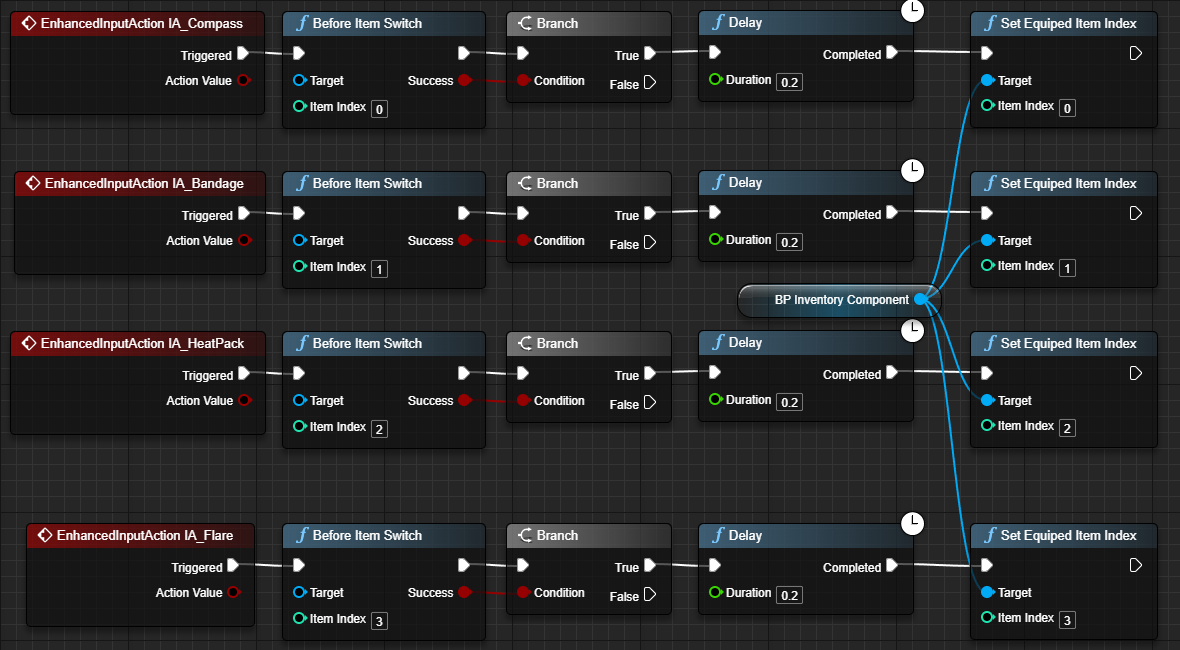
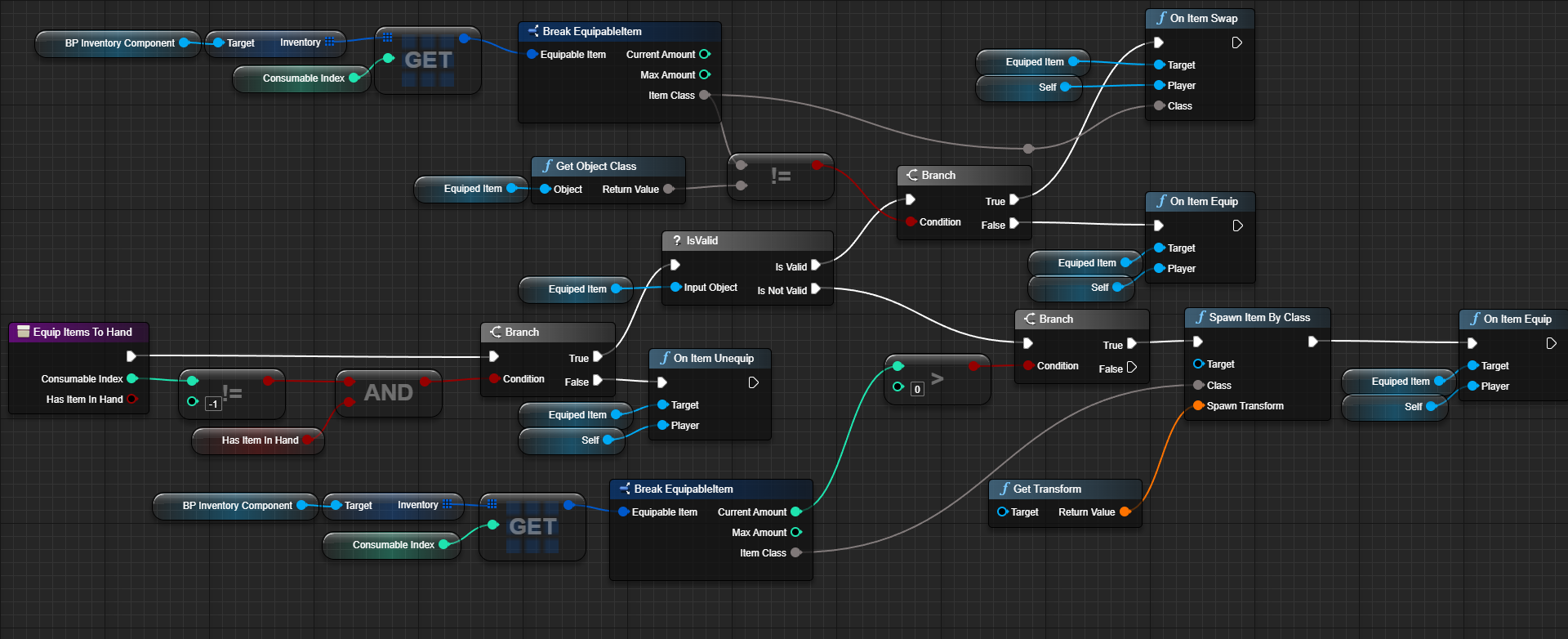
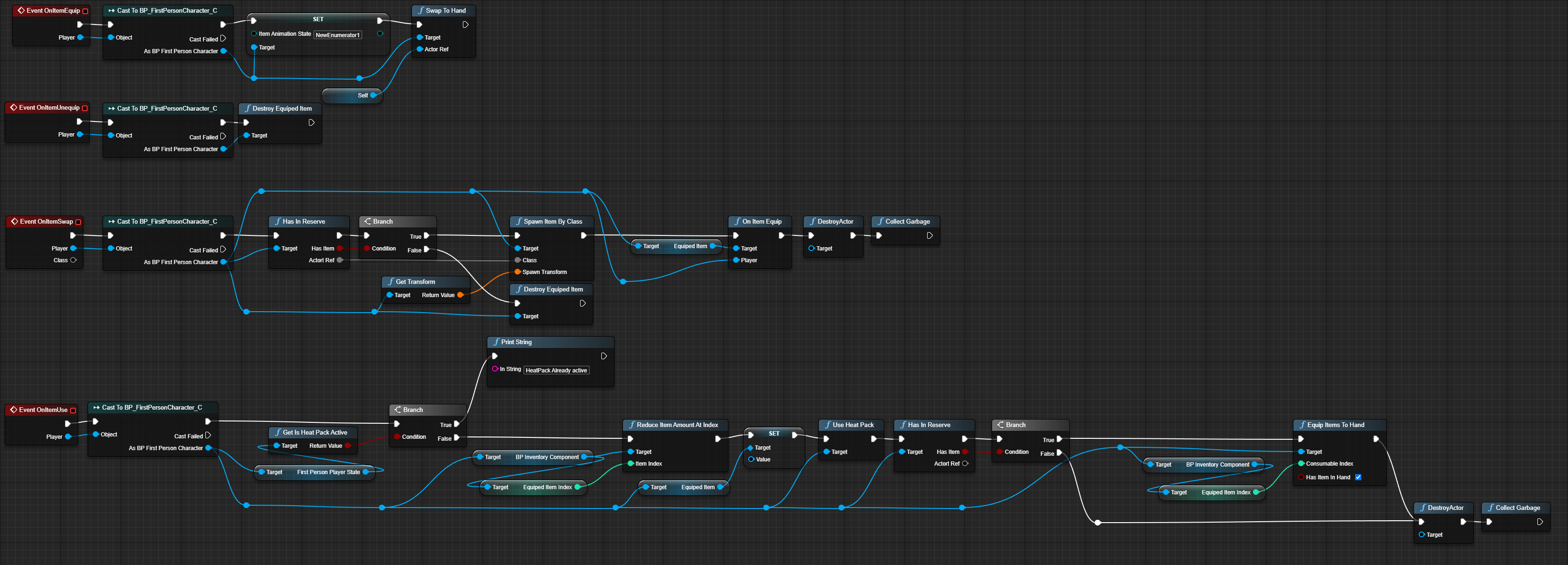
And the implementation in blueprints is done where when the player clicks keys 1 through 4, first it calls the "Before Item Switch" function where it just checks if an animation montage is playing and also does a hotbar flash. Then it continues to the "Set Equiped Item Index" where it just calls back to the "Equip Items To Hand" function where it handles the different states the item can be at, if it should switch the item to the new one or should it just unequip it and so on. It sends the an event message to the equipped item through an interface where it calls its own implementation of the item. Right bellow is a snipet of blueprint code of how the heatpack handles each case and also the "On Item Use" event call.
Bear AI
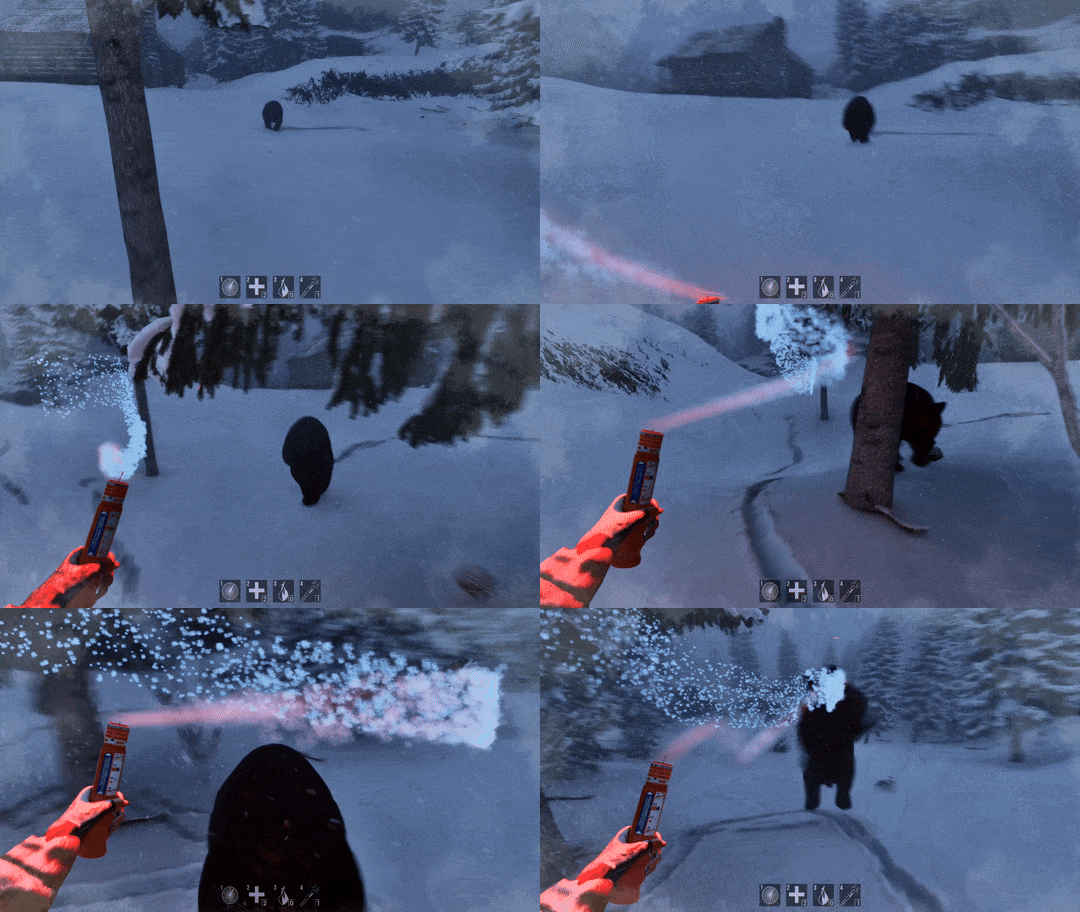
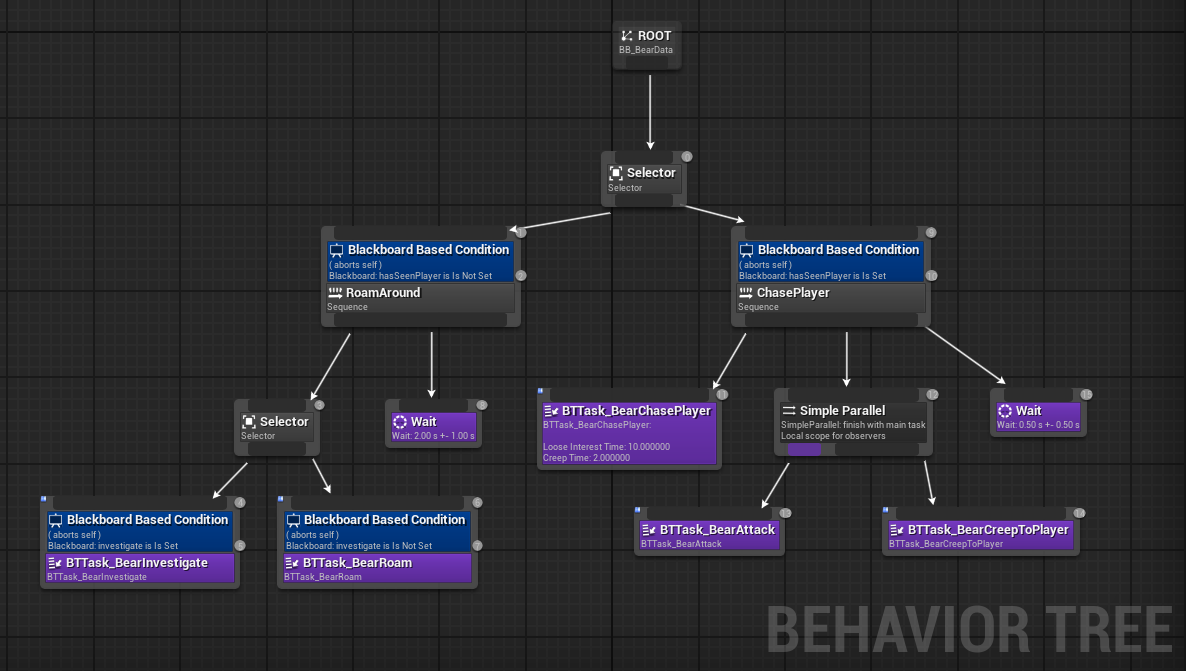
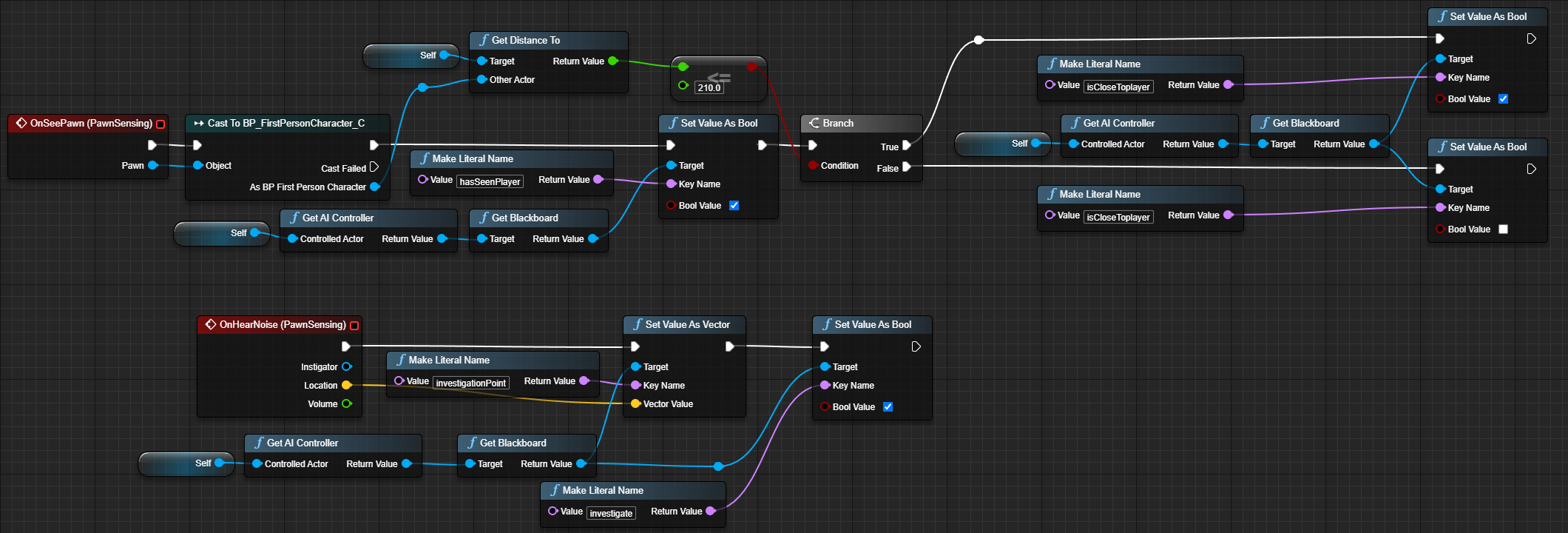
The second task I needed to do was an AI Bear. Where it can roam, chase and attack. It is a highly dangerous animal that if you encounter it, there is only a small chance for you to get away. The AI uses the Unreal Engine's Behavior Tree, where it switches between states affected by the player's interaction with it. For example, if the player comes into view or gets too close to the bear, its behavior will change.
Interaction System
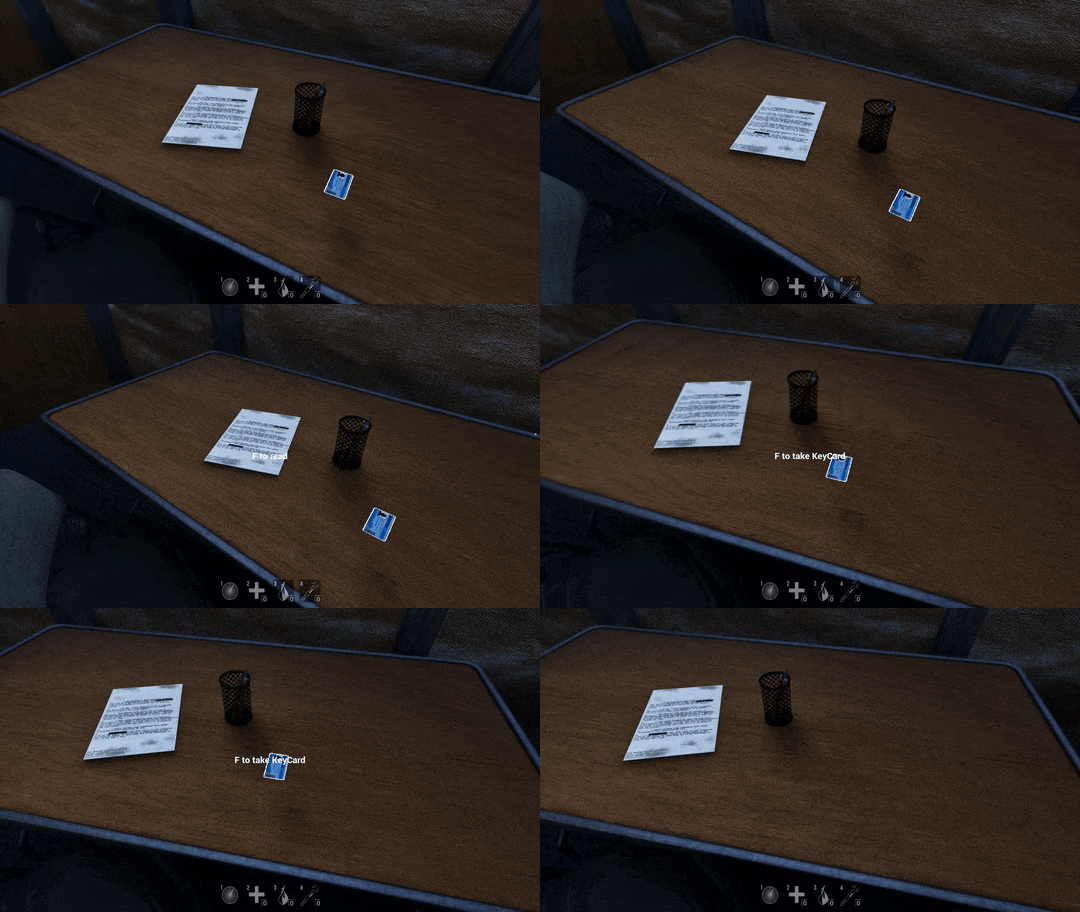
Another responsibility I had was to implement the interaction system where you can press F to interact with sertain objects. Additionaly when a player hovers over an interactable it will show for what that interaction may do with an UI element.


My Takeaways
Since it was the first group project in Unreal I learned a lot
about the many quirks and ways it is different compared to
Unity.
I learned what it is like to work on a single
project for a longer period of time and how to take
responsiblily/ownership for my tasks making sure they are done
in time.